RETURN_TO_REGISTRY
EdgeTwin: A Real-Time C# Simulator for Industrial Digital Twins
UPDATED
C#.NETBlazorRoslynDigital TwinIndustrial IoTMQTT Sparkplug BSiemens S7EtherNet/IPReal-Time Simulation
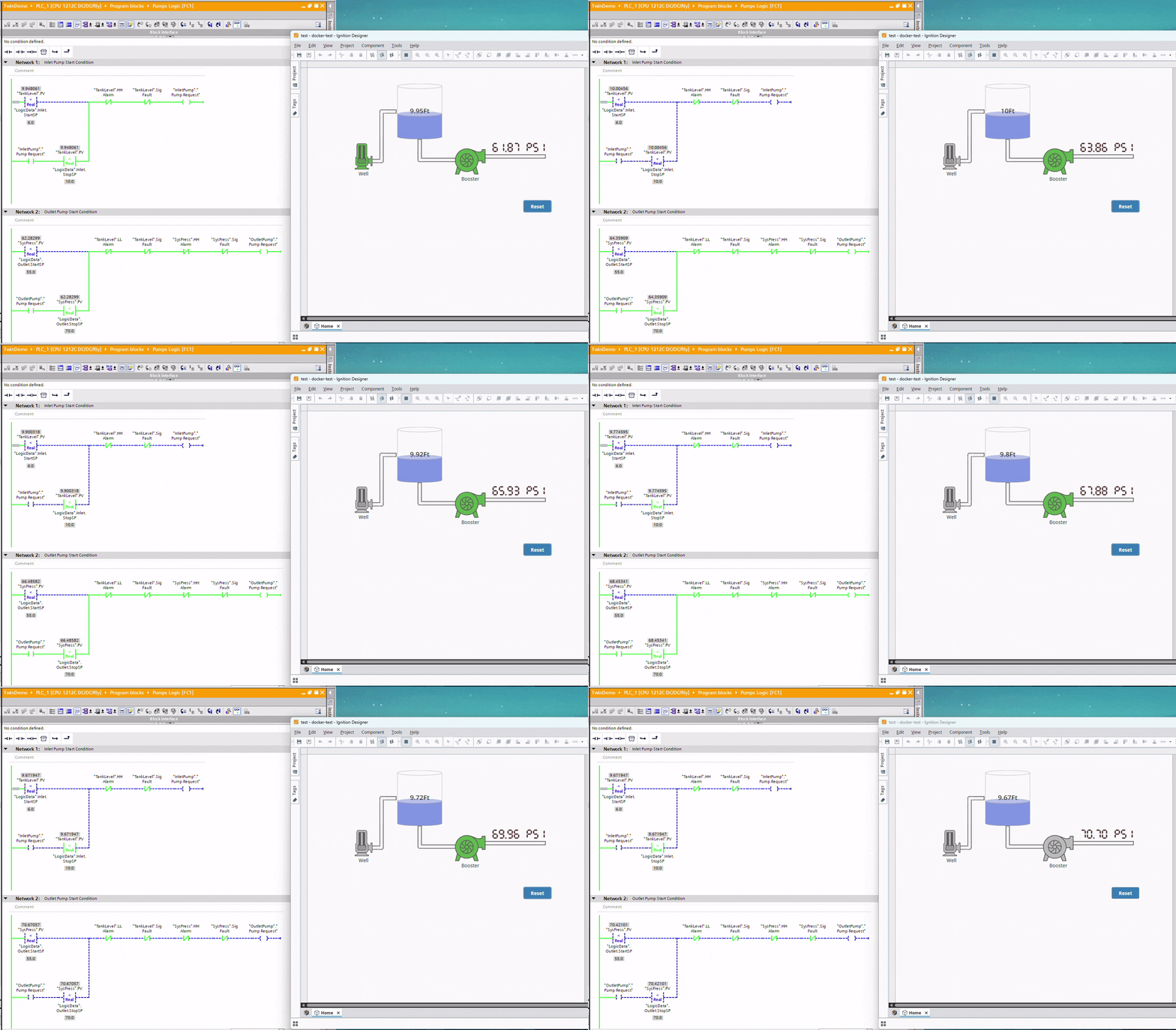
Testing PLC logic today usually means one of two things: a shelf full of vendor hardware, or hand-typed static values that never behave like a real process. The second option can be done cleanly — I've written about a non-invasive way to inject those values straight into the input image across Siemens, MicroLogix, and CompactLogix — and it's genuinely useful for validating logic. But injected values, however elegantly you get them in, are still just values. They sit there. They don't rise, fall, oscillate, or fight back the way a real process does.
Industrial simulators were supposed to close that gap, but they've traditionally been proprietary black boxes, or rigid programs hardcoded inside PLC memory.
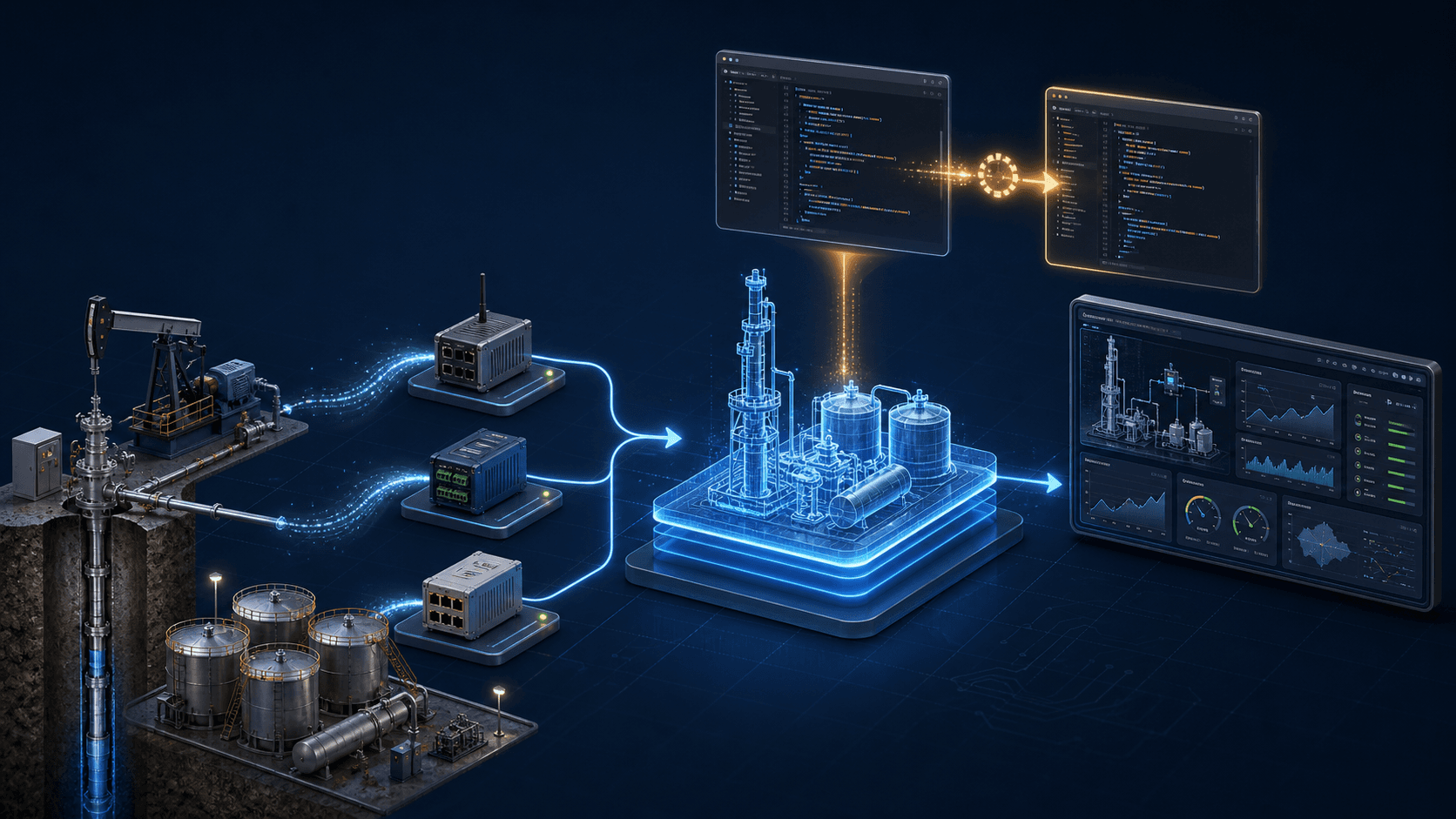
EdgeTwin is our answer: a real-time, software-defined industrial simulator built with .NET 10 and Blazor Server. It simulates complex physical behaviors — oil production wells, gas-locking ESP pumps, three-phase separators — and speaks the same protocols real hardware does: MQTT Sparkplug B, Siemens S7, and Allen-Bradley EtherNet/IP. Bind a virtual well to a real PLC's inputs, and your control logic gets tested against physics, not placeholders.
The Core Value Proposition
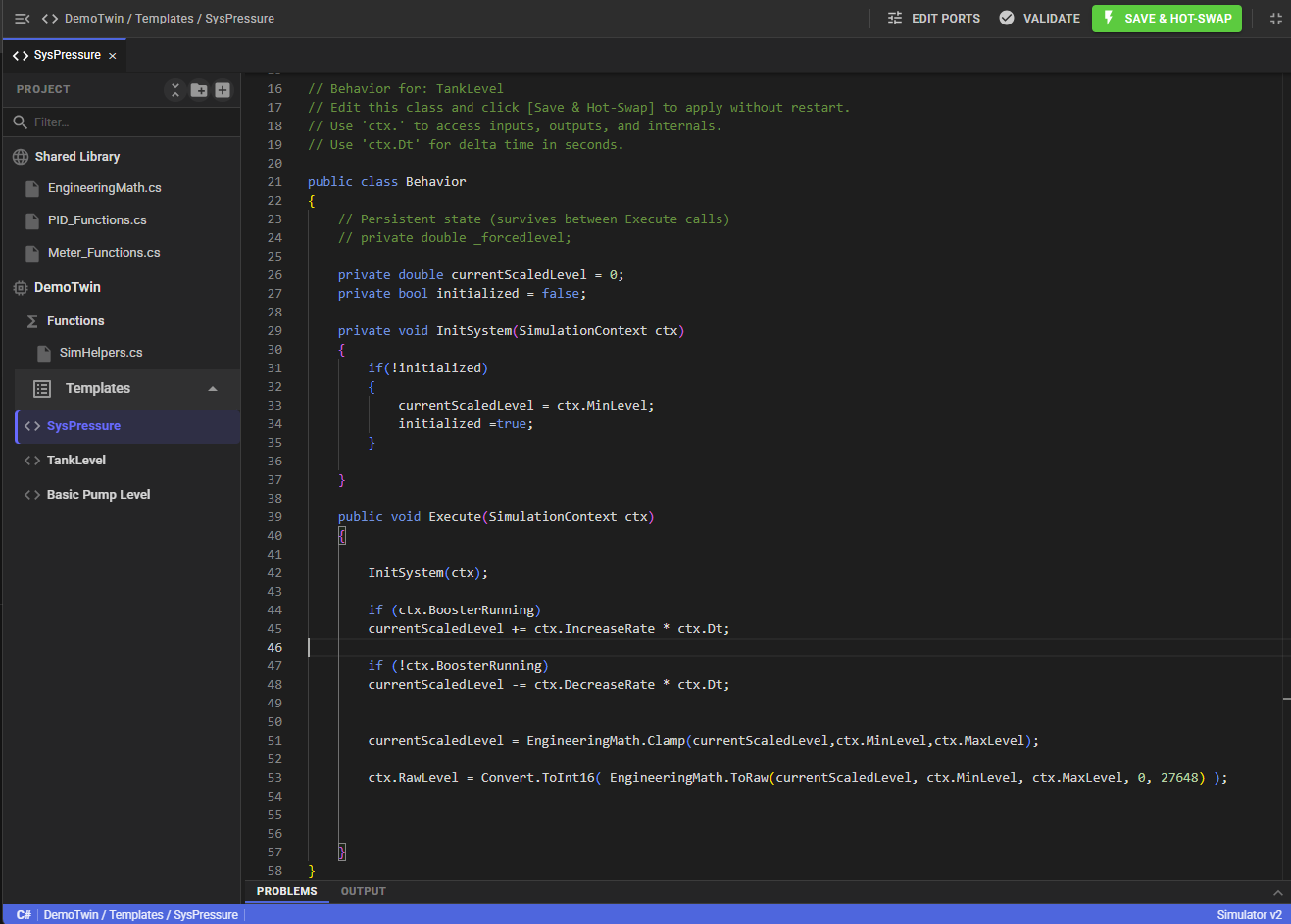
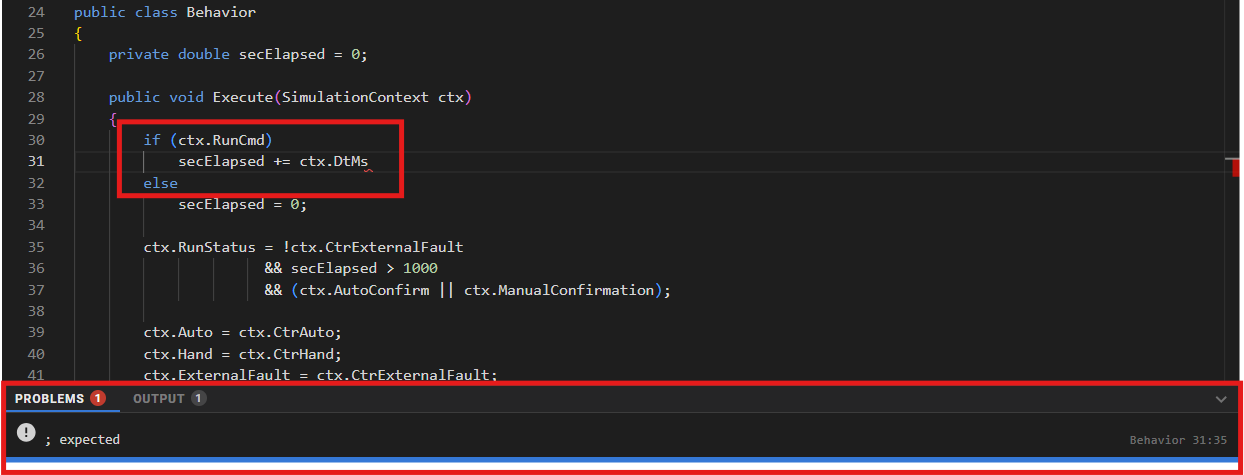
Instead of locking simulation logic inside a vendor tool, EdgeTwin shifts it into a high-performance C# engine. Engineers write simulation logic directly in the browser via an integrated Monaco code editor (the visual engine behind VS Code), and it compiles dynamically at runtime using Microsoft Roslyn.
EdgeTwin is a software-defined simulator that shifts simulation logic into a high-performance C# engine. It allows engineers to write simulation logic directly in the browser via an integrated Monaco code editor (the visual engine behind VS Code) and compiles it dynamically at runtime using Microsoft Roslyn.
Key Highlights
Dynamic Code Execution: Write standard C# using math functions (
Math.Sin, linear interpolation, low-pass filters) and execute it inside a real-time scan loop.Hot-Swapping: Save and hot-swap code on the fly with zero restart time and zero memory leaks thanks to collectible assemblies.
Hardware Independence: Bind virtual ports to physical registers or MQTT topics. Test your actual PLC code by injecting simulated outputs directly into PLC input registers.
The Technology Stack
Front-End & UI: Blazor Server, Vanilla CSS (Glassmorphism, Dark Mode, Responsive layout), and
BlazorMonacowrapper.Compiler Pipeline: Microsoft Roslyn Scripting API (
Microsoft.CodeAnalysis.CSharp).Runtime & Memory: Custom C#
AssemblyLoadContextconfigured for JIT assembly loading and garbage collection.Connectivity Layers: MQTT client utilizing Sparkplug B payloads, custom Allen-Bradley EtherNet/IP drivers, and Siemens S7 communication drivers.
Database: SQLite (used for persistence of templates, overrides, instances, and historical data logs).
Diagram 1: High-Level System Topology
This diagram represents the overall system layout of EdgeTwin, outlining how the web client, the compilation engine, the database, and the external network nodes communicate.
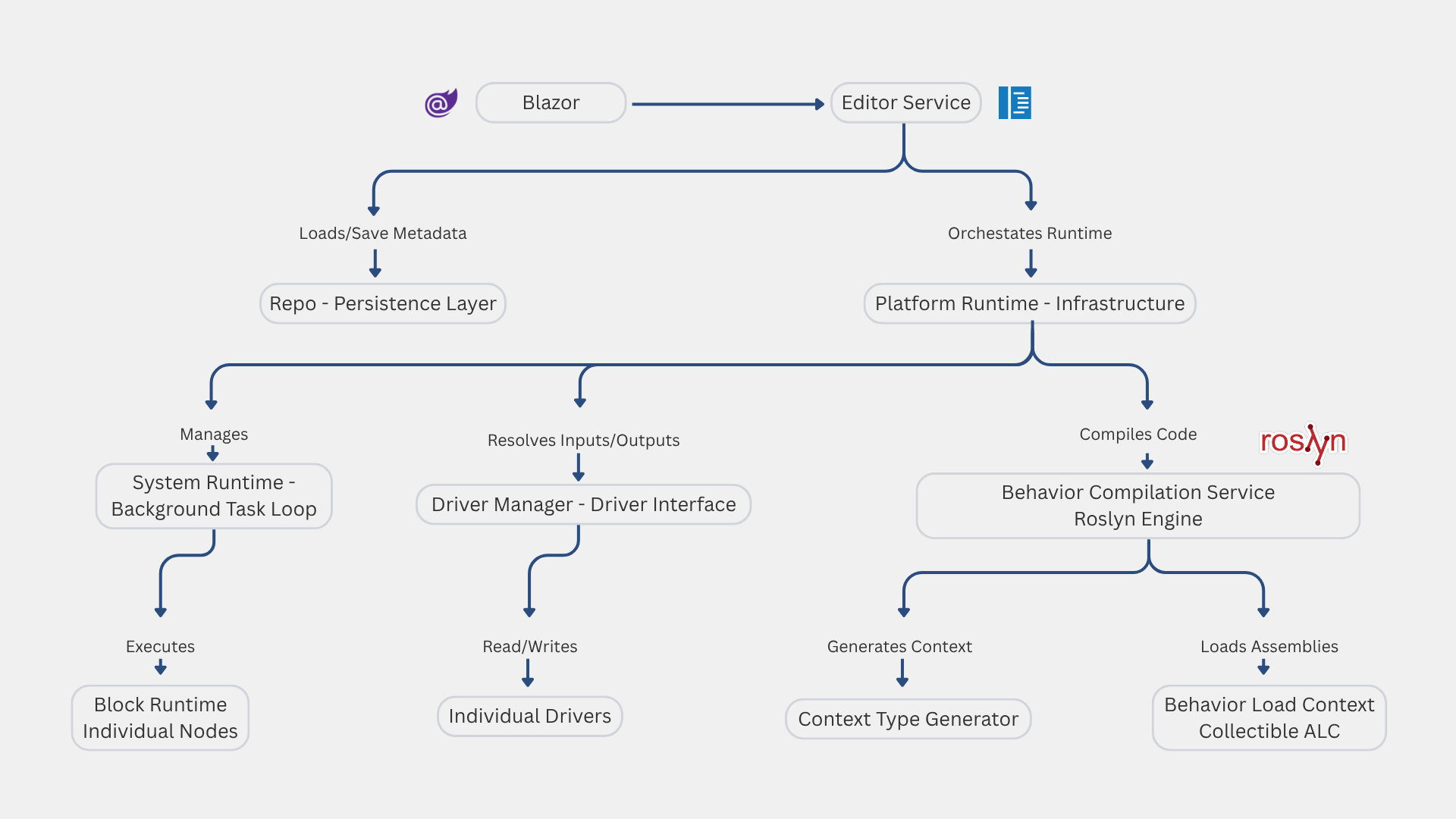 Three tiers, left to right:
Tier 1 (Client): Web UI (Dashboard, Monaco Editor).
Tier 2 (Server/Engine): Blazor App Hosting + Runtime Engine (
SystemRuntimeandDriverManager).Tier 3 (Data & Network): SQLite DB & external network drivers/hardware.
 Detailed Control Narrative
The Code Loop:
The developer opens the Blazor UI and writes a simulator C# script inside Monaco.
When saved, the code is sent via SignalR to the backend, which parses the string and saves the updated source definition to the SQLite Database.
The Execution Loop:
The backend host instantiates a
SystemRuntimefor each active asset (e.g. Well 1 system).The
SystemRuntimeruns a background task scanning at a configured rate (e.g. 100ms cycle rate).In each scan cycle, the runtime pulls variables from the SQLite definitions, reads PLC/MQTT input registries via the
DriverManager, runs the compiled C# script, and writes the output values back.
The Driver Loop:
The
DriverManagerinitializes worker tasks for each loaded driver (Sparkplug B, Siemens S7, Allen-Bradley).These drivers maintain open sockets to physical PLCs or the central MQTT Broker, buffering values in memory so that the engine's 100ms scan loop doesn't block on network latency.
Diagram 2: Where IT Meets OT — Drivers & Instances
This is the actual seam between the two worlds EdgeTwin bridges. On one side, IDriverManager holds live connections to MQTT/Sparkplug B, Modbus, Siemens S7/S7+, OPC UA, and Allen-Bradley EtherNet/IP-CIP — the protocols real PLCs and SCADA systems speak. On the other, each BlockRuntime instance exposes plain, index-mapped input/output arrays that compiled C# behavior code reads and writes. The driver layer writes telemetry straight into the input array; the behavior marks outputs dirty; those changes publish back out over the same industrial protocols.
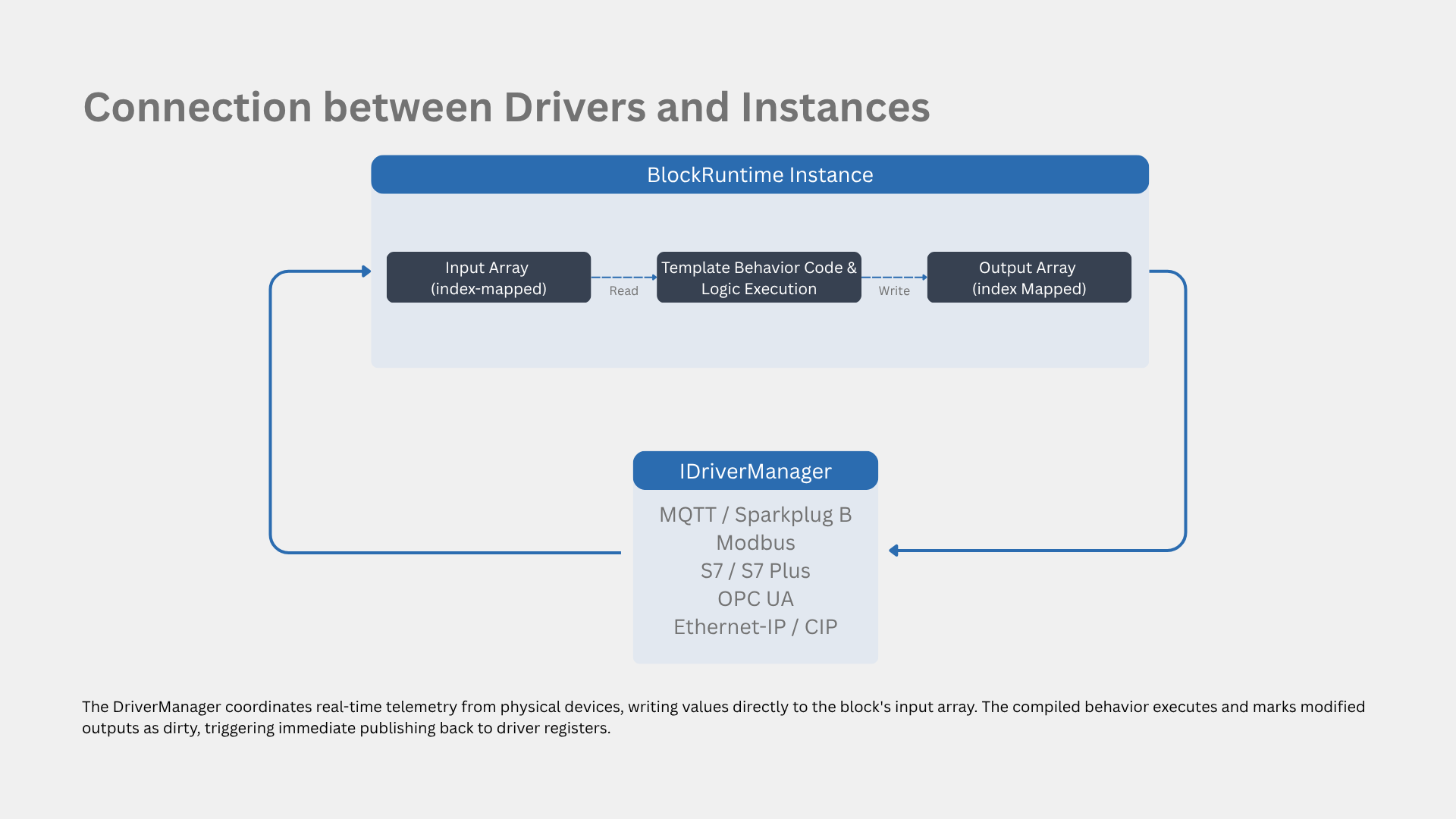
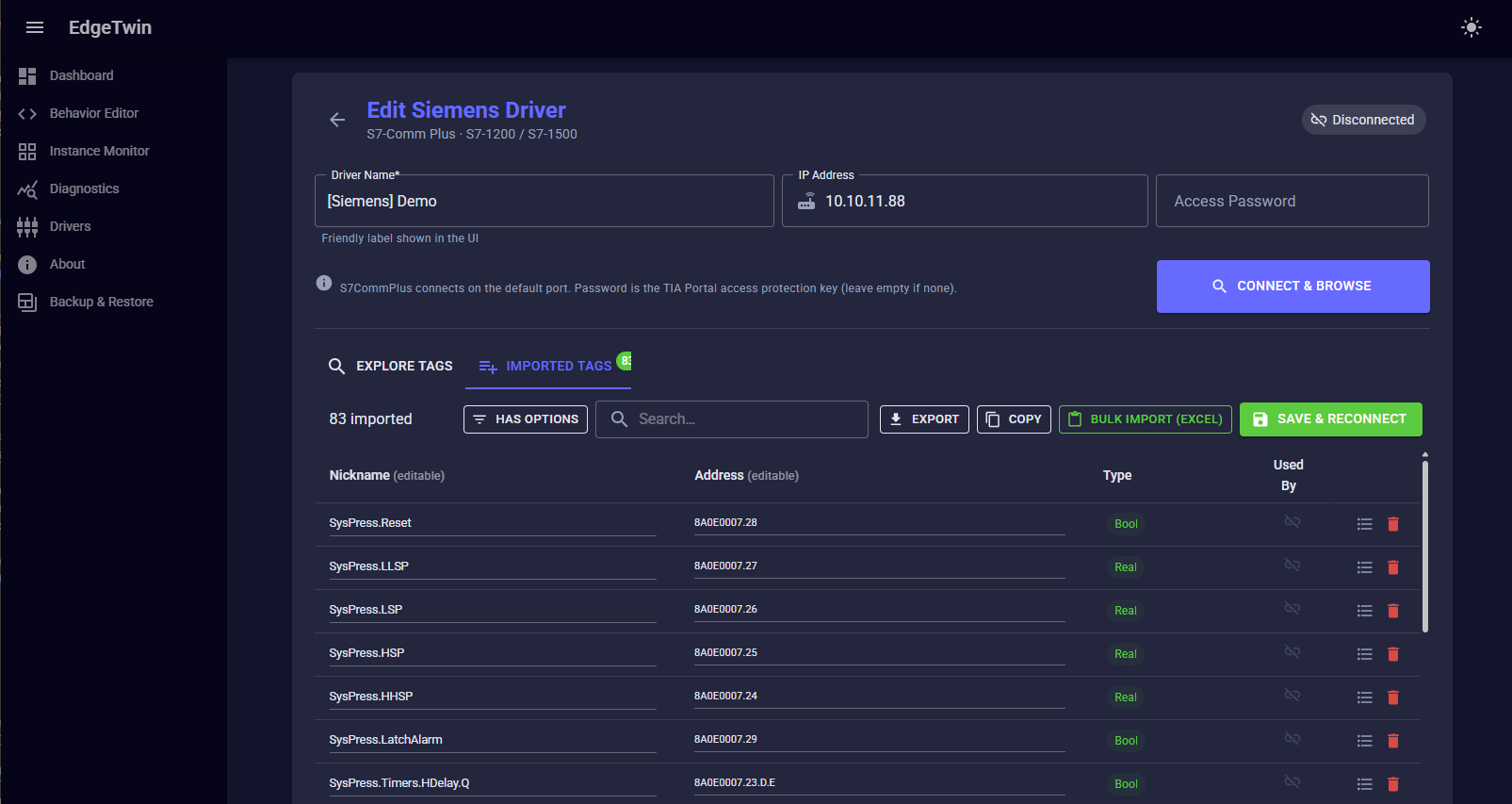
Diagram 3: Live Hot-Swap Sequence
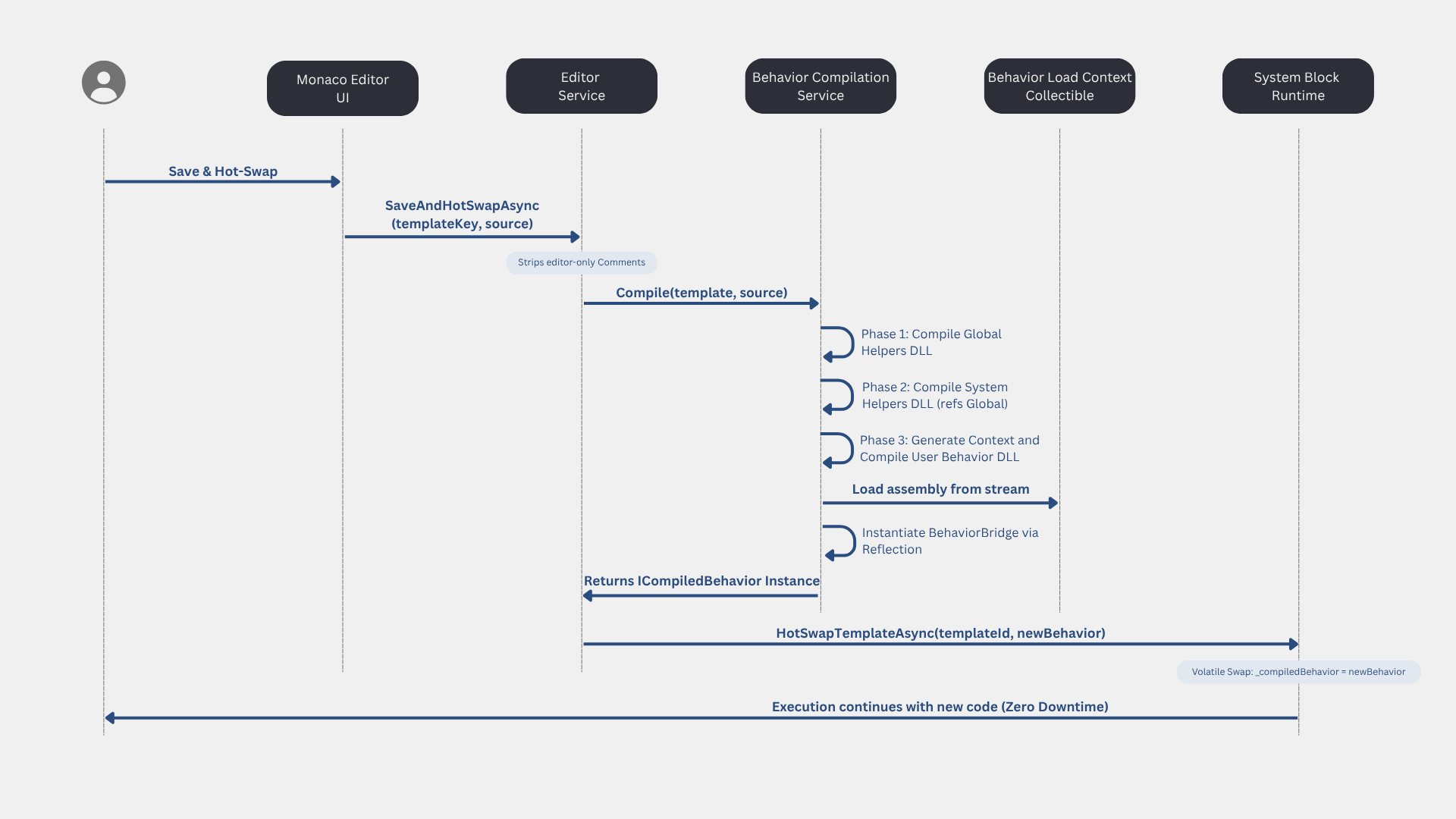
The flagship interaction: an engineer edits behavior code in Monaco and hits Save & Hot-Swap. The source compiles through Roslyn in three phases (global helpers → system helpers → the behavior itself), loads into a collectible AssemblyLoadContext, and swaps into the live SystemRuntime with a single volatile reference write — picked up on the very next scan cycle. No restart, no dropped driver connections, and the old assembly is later garbage-collected because the load context is collectible.
 Evaluating the Platform: Real-World Benefits and Trade-Offs
No engineering architecture is perfect. To maintain a realistic perspective for engineering teams or technical clients, here is an honest evaluation of the benefits and trade-offs of the EdgeTwin platform:
The Pros: High ROI and Low Hardware Barrier
Zero Hardware Footprint: You do not need massive, expensive test benches loaded with physical sensors, valves, and loop controllers to validate your SCADA systems.
Minimal PLC Requirements: To test, you only need a single desktop PLC (or a local broker). The physical test PLC does not even need to match the brand or model of the real production PLC, as long as it supports one of the standard protocols:
MQTT Sparkplug B
Siemens S7-Plus / S7-Comm
Allen-Bradley EtherNet/IP
Modbus TCP / RTU
You can run a Siemens tank simulation, publish its variables to a Modbus register or MQTT topic, and test your SCADA system seamlessly.
The Cons: What You Need to Know (Prerequisites)
C# Syntax Requirement: Because EdgeTwin leverages the raw power of the .NET JIT compiler instead of a simplified block-diagram UI, the engineer writing the simulation template must be comfortable writing C# code.
Process and Physics Domain Knowledge: While you do not need a PhD in fluid dynamics, you must understand the physical process you are trying to recreate. If you are simulating a three-phase separator or an ESP pump gas lock, you need to understand the relationship between pressure, intake flow rates, and currents to model them accurately in C# math.
Diagram 4: The Object Model — System, Template, Instance
Three concepts underpin everything above: a System is an independent execution environment on its own thread and scan rate; a Template defines the interface (ports) and C# logic; an Instance is a concrete running node of a Template, bound to real driver tags. Editing a Template while Instances are running doesn't cold-restart the plant model — only the systems that own that template pause, and a live-value snapshot carries state across the reload instead of resetting to zero.
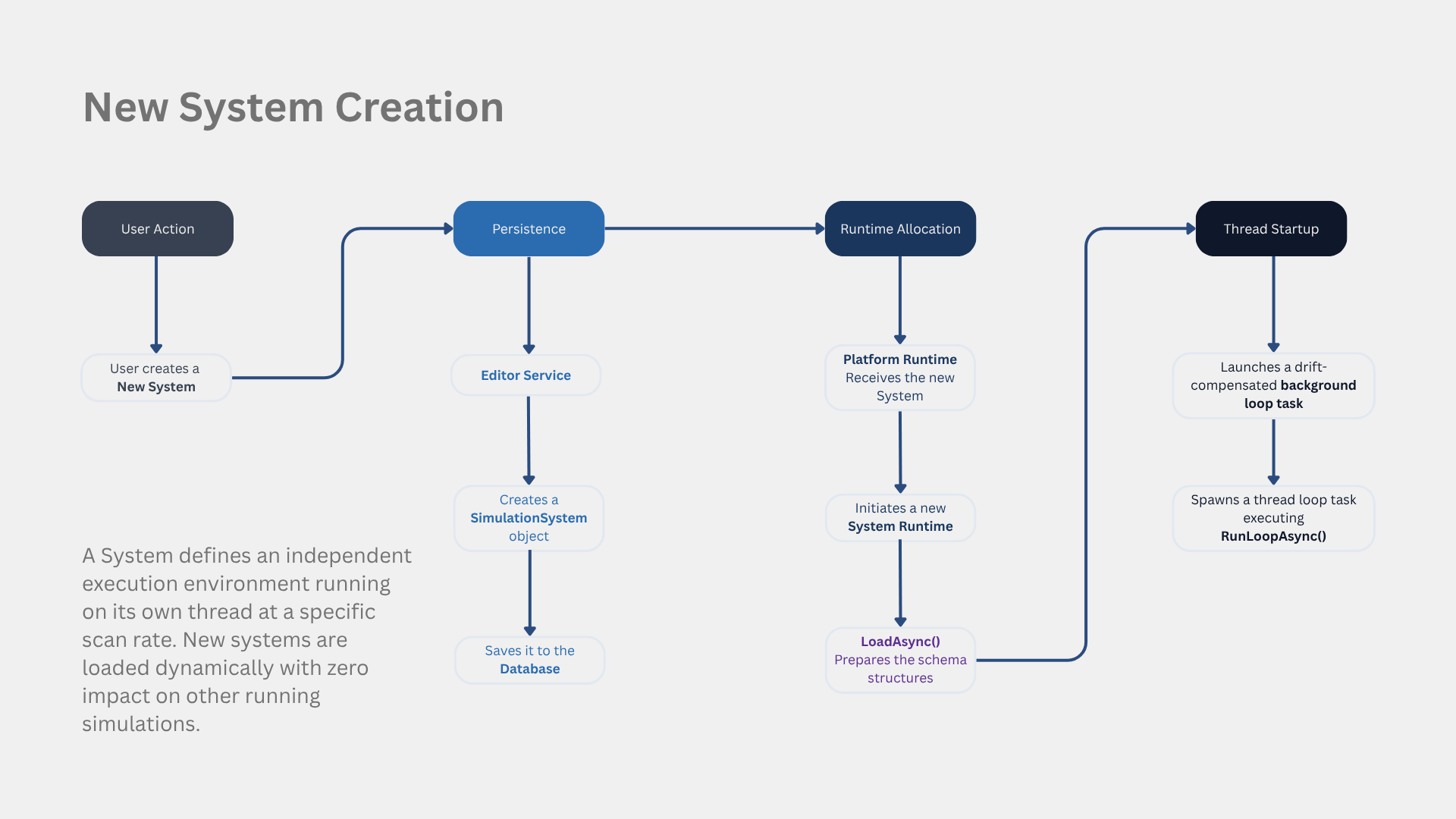
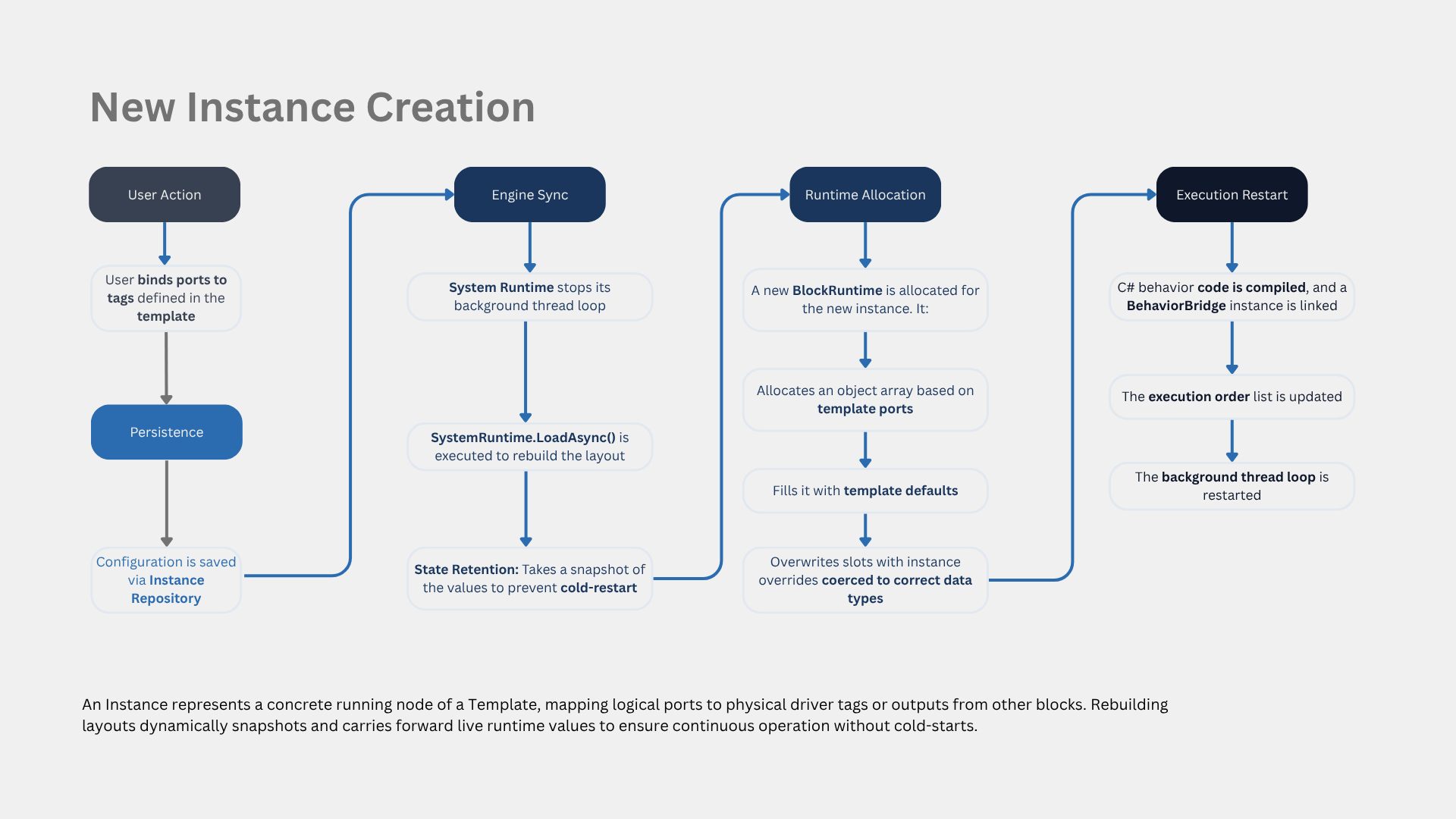
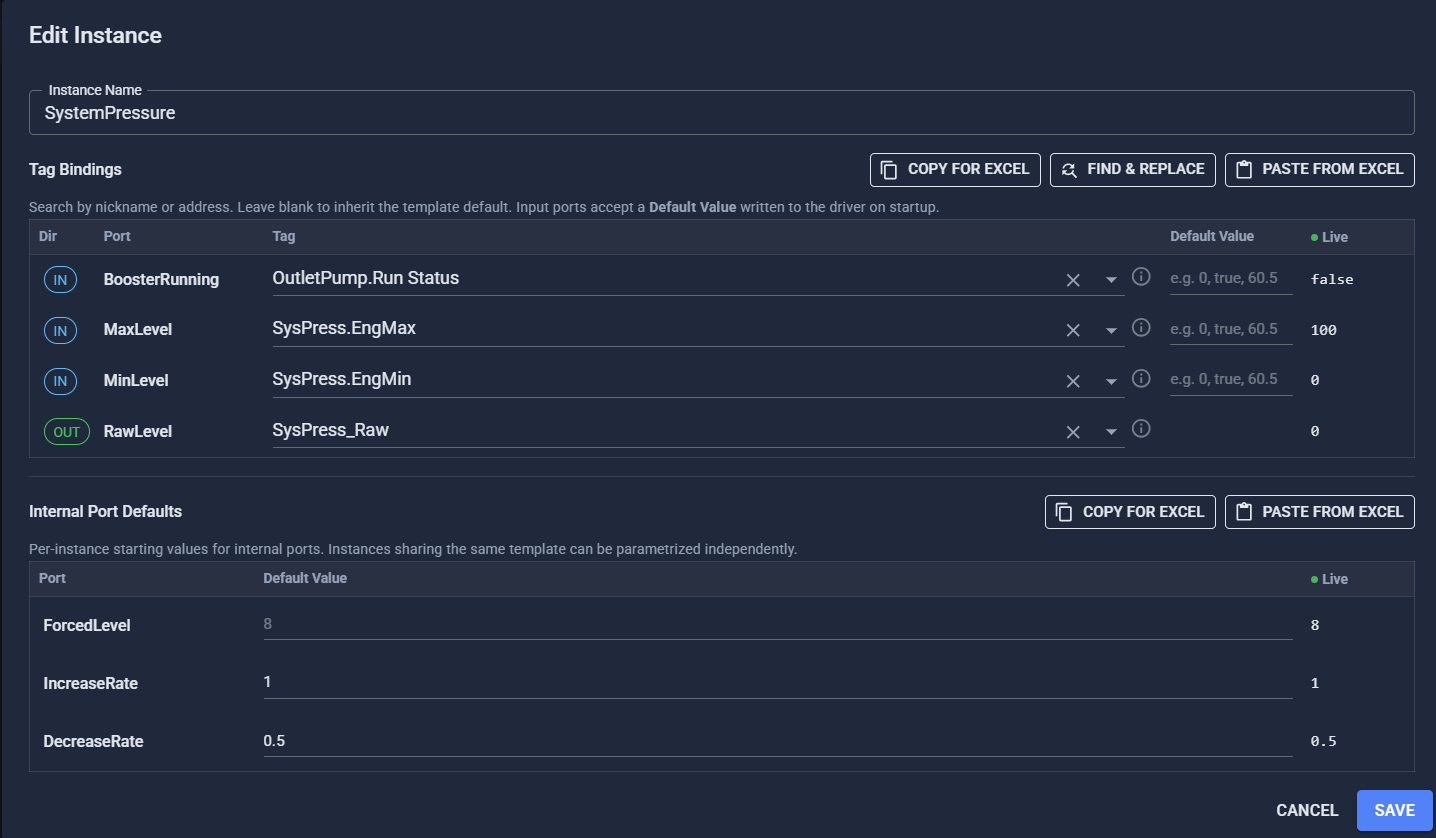
Diagram 5: Deterministic Scan Loop & Fault Isolation
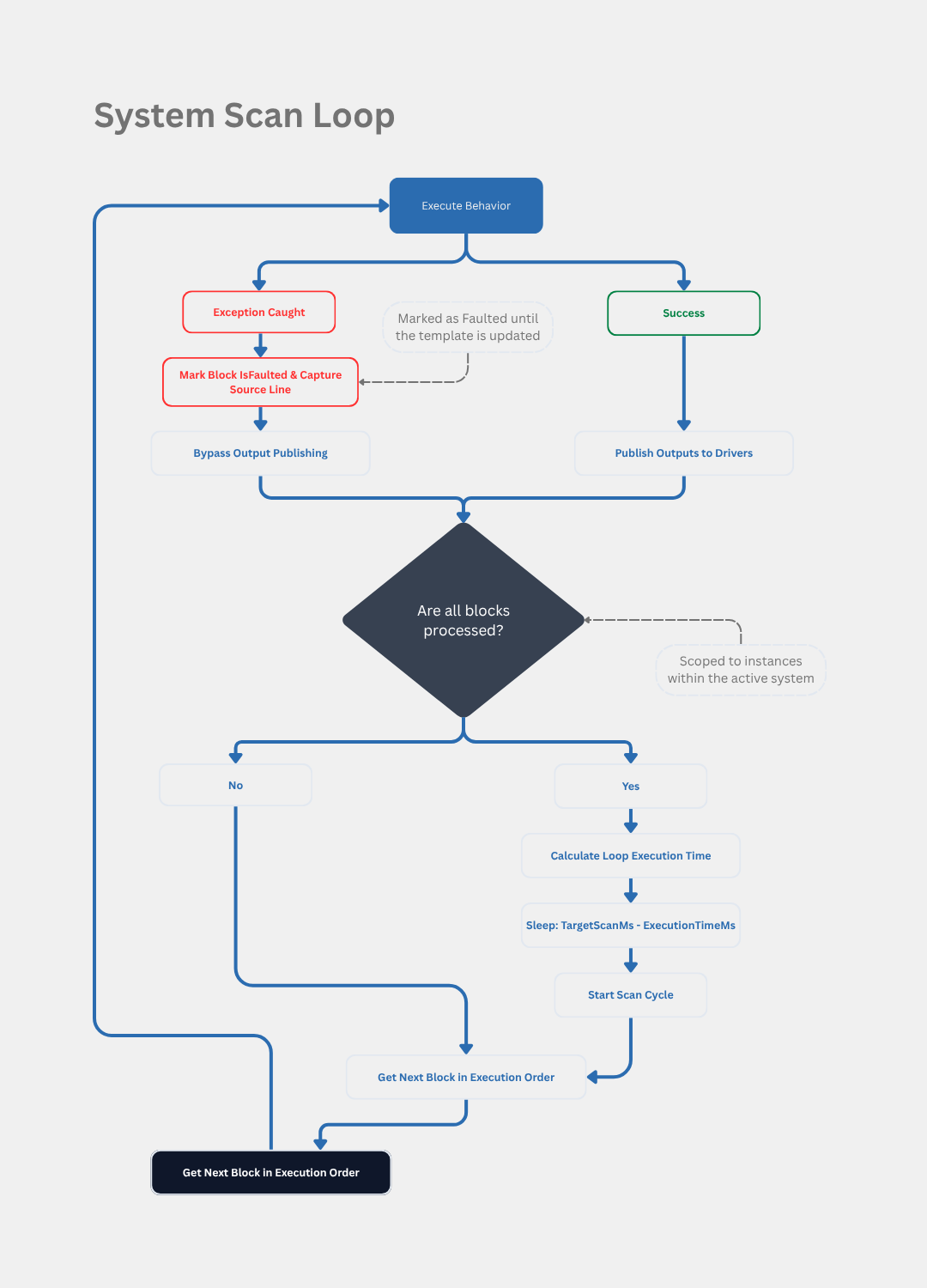
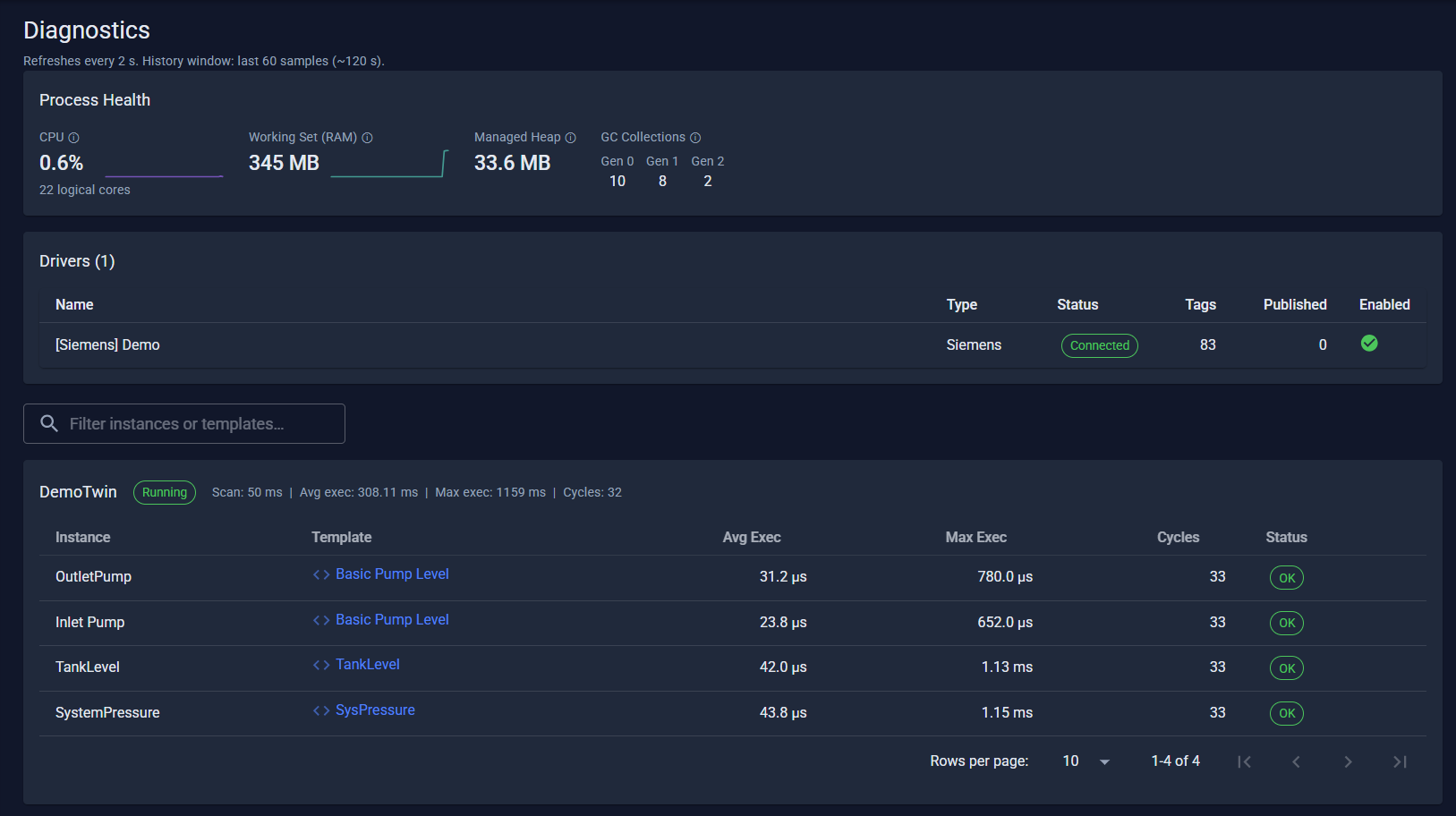
Each system runs its blocks in a fixed order, hundreds of times a second. An unhandled exception in one block's C# doesn't crash the system — that block is marked faulted and skipped on future cycles while every other block keeps running. After each full pass, the loop calculates its own execution time and sleeps only the remainder of the target scan interval, so it doesn't drift off its target rate under load.
 Where This Actually Gets Used
Architecture is only interesting if it solves a real problem. Here's what EdgeTwin is actually for, in practice:
Validating PLC logic against a living process, not static test values. A motor-start interlock (the kind of sequencing in MotorStart_Logic) is usually only ever tested against a handful of hand-typed values. Bind a real PLC's inputs to EdgeTwin instead, and it gets tested against dynamic, physically-plausible behavior — including the fault conditions (like an ESP gas-lock event) that are rare and risky to reproduce on a real well — before the logic ever ships to the field.
Commissioning SCADA/HMI screens without field access. Standing up a new alarm rule or dashboard panel for a well pad traditionally means either flying an engineer out to the site or booking time on a shared vendor test bench. EdgeTwin runs a virtual well — pump, separator, tank — speaking the exact Sparkplug B / Modbus / S7 tags the real SCADA expects, so the HMI gets fully commissioned from a desk before it ever touches production hardware.
Training operators on failure modes you can't safely trigger live. Walking a new operator through how a separator upset or a gas-locked ESP actually looks on the HMI is either impossible or dangerous to do on production equipment. Because behaviors hot-swap with zero downtime, an instructor can script a fault scenario and push it into a training session in real time.
Testing multi-vendor protocol integrations without owning one of each vendor's hardware. A historian or SCADA platform that has to ingest Siemens, Allen-Bradley, and MQTT data simultaneously is hard to integration-test end-to-end without a shelf full of PLCs. EdgeTwin runs all three protocol stacks at once against the same simulated assets, so test coverage stops depending on physical inventory.
Generating labeled data for predictive-maintenance R&D. Detecting a failure mode like gas interference in an ESP normally requires labeled failure data that's expensive and rare to capture from real production wells. Scripting the physics of that failure mode directly in C# produces as much repeatable, labeled data as needed to validate a detection algorithm before it ever sees production telemetry.
The common thread: anywhere a team needs the physical world's behavior without the physical world's cost, risk, or lead time — that's the gap this fills.
EdgeTwin is an internal tool we built for our own commissioning and validation work — it's not (yet) a public product. If you're curious how it performs on a real project, . For questions about the architecture, reach me via Oscar Calix | My Portfolio
Oscar Calix
Sr, Control System Engineer
Cloud computing for OT, industrial data pipelines, SCADA supervision, full-stack tools for automation workflows..
.png&w=3840&q=75)