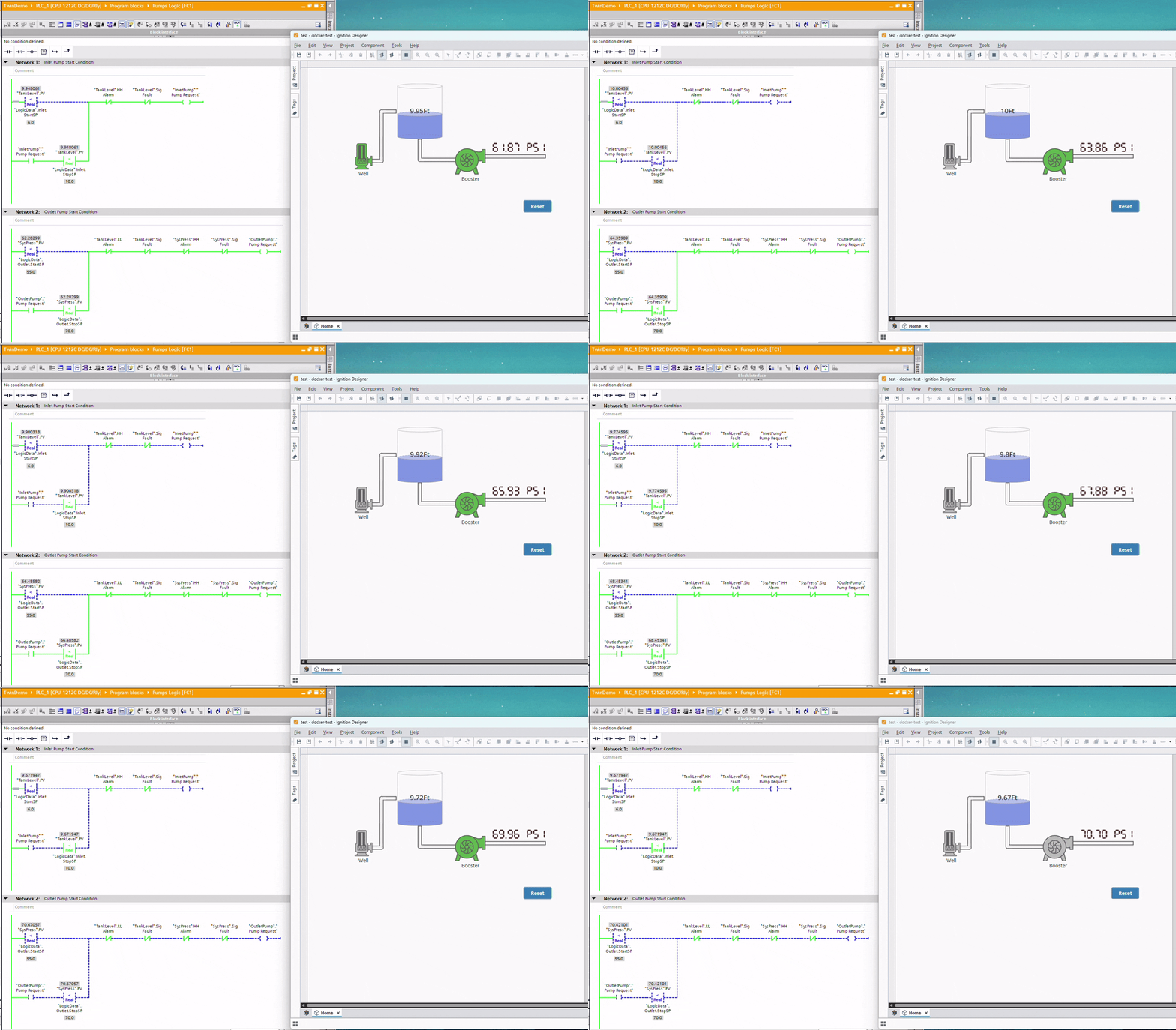
Testing PLC Logic Without the Hardware: A Non-Invasive Trick for Siemens, MicroLogix, and CompactLogix
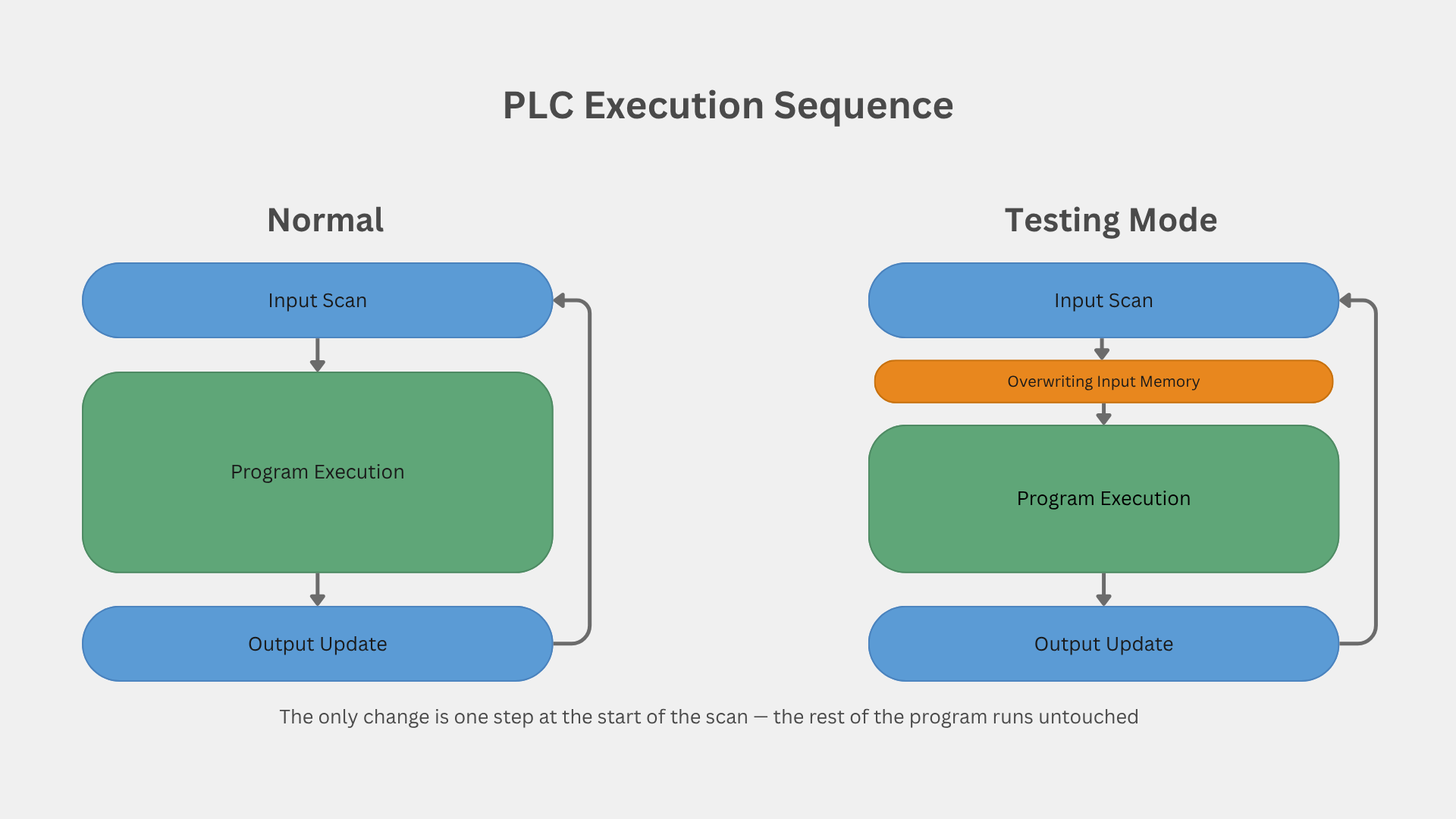
Every automation engineer eventually hits the same wall: you have a program to test, but you don't have the I/O sitting in front of you. The modules haven't arrived, they're already installed at a site 500 km away, or the controller on your desk simply isn't the one the program will run on. You could wait. You could build a wiring harness and a box of toggle switches. Or you could feed the logic its inputs from memory and get on with it.
The last option is what I do, and over the years I've settled on a version of it that has one property I care about above all else: it doesn't touch the logic. The program I test is byte-for-byte the program that ships. No temporary rungs sprinkled through the code, no "remember to delete this before download" comments, no risk that a test hack survives into production. There's exactly one small block at the top of the scan, and when I'm done, in most cases I don't even have to remove it.
The core idea is simple and it's the same on every platform: the rest of your program reads its inputs from the input image (or the input tags). It has no idea whether a physical module wrote those values or you did. So you write them yourself, once per scan, before any logic runs. That's it. What changes from platform to platform is how you get your fake data into that input area — and those differences turn out to be a nice little tour of how three different PLC architectures actually store their I/O.
I'll go through all three: Siemens S7-1200 (TIA Portal), Allen-Bradley MicroLogix (RSLogix 500), and Allen-Bradley CompactLogix (Studio 5000). The principle is identical. The technique is different each time, and the reason it's different is the interesting part.
Siemens S7-1200 — injecting into the process image
On Siemens, my testing lives in one function called first thing in OB1, and a data block that holds my fake values.
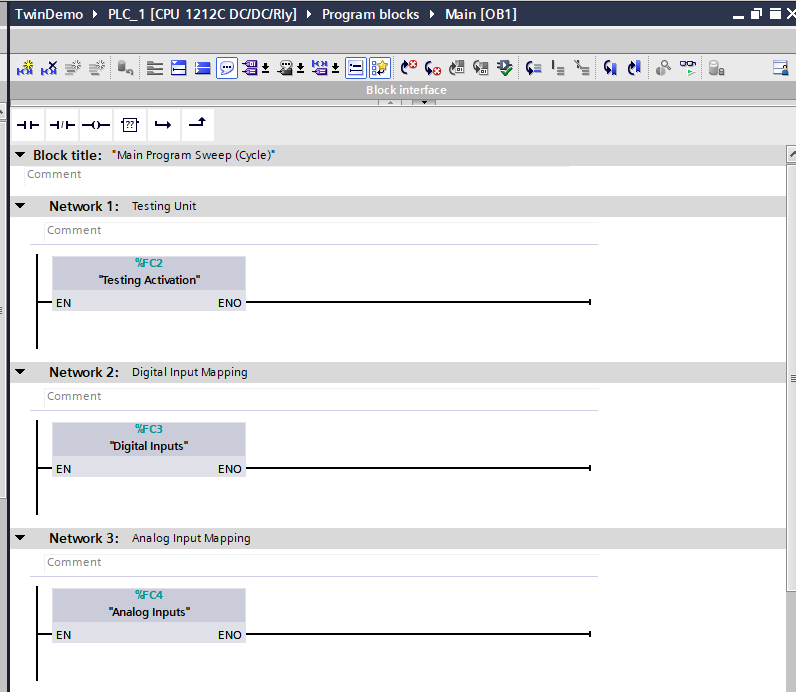
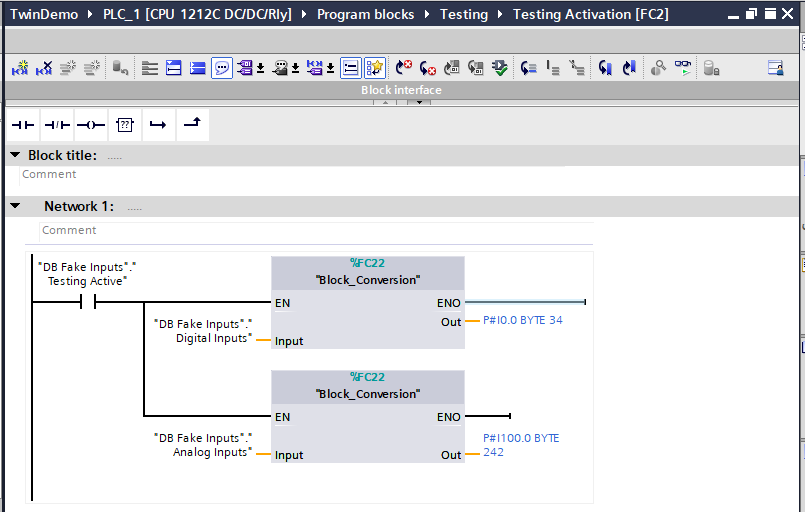 Notice the order.
 Testing Activation runs as Network 1, before anything else. That's deliberate: whatever it writes into the input image is in place before a single line of real logic reads it. Everything downstream — the input mapping functions, the analog instances, the pump calls — runs exactly as it would with real modules bolted on.
The fake data lives in a DB I call DB Fake Inputs, sitting alongside the testing function in the project tree.
Inside that DB there are three things: a Testing Active boolean that acts as the master enable, a Digital Inputs array, and an Analog Inputs array.
The digital conversion writes 34 bytes starting at %I0.0 (enough to cover the array), and the analog conversion writes to the input word area. The conversion block itself is just Siemens' Serialize and Deserialize instructions doing the bit-packing for me:
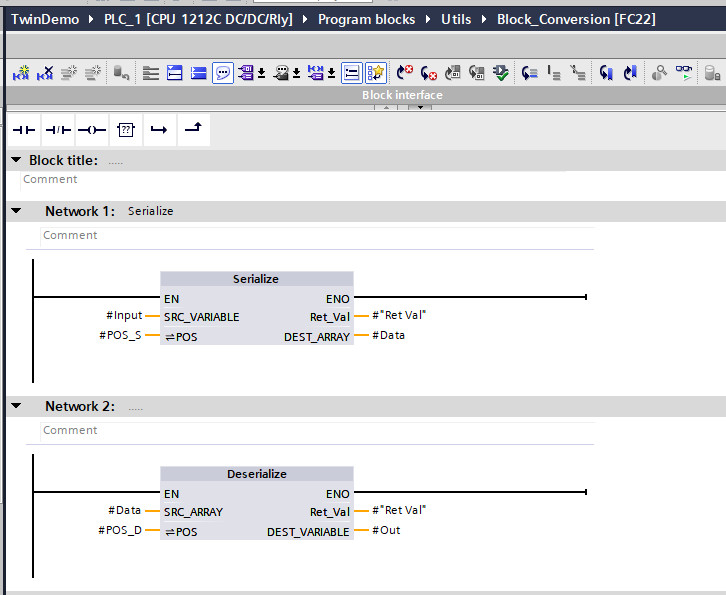 So the enable bit is off in production (or you remove the one call), the physical modules refresh the input image as normal, and the logic never knew the difference.
Allen-Bradley MicroLogix — a single COP and you're done
The MicroLogix version is the same idea stripped to its simplest possible form, and it's a great contrast to Siemens because the platform's memory model does the hard part for you.
At the very top of the main ladder, I jump to a testing subroutine — exactly the same "run it first" principle as Network 1 in OB1:
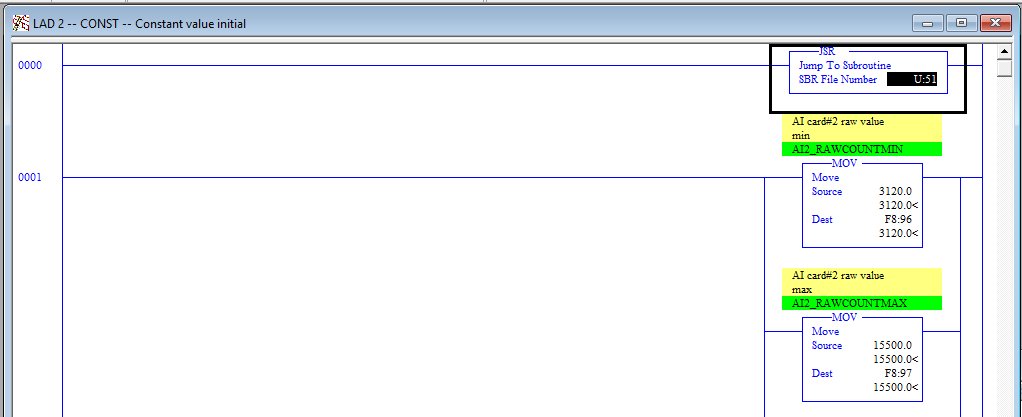 The subroutine itself is two rungs. The first is a first-scan seal-in that turns on my
 Testing ON bit. The second does the actual work: a COP (Copy File) that bulk-copies my fake binary file into the input file.
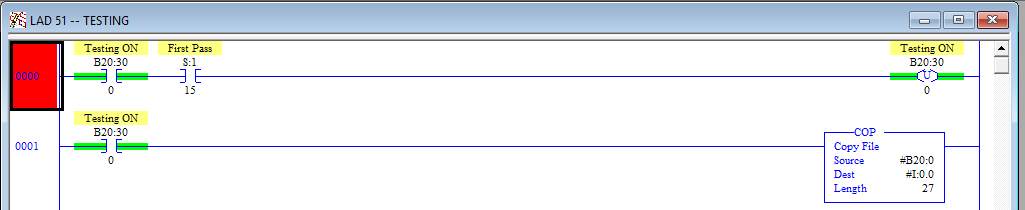 That's the whole thing.
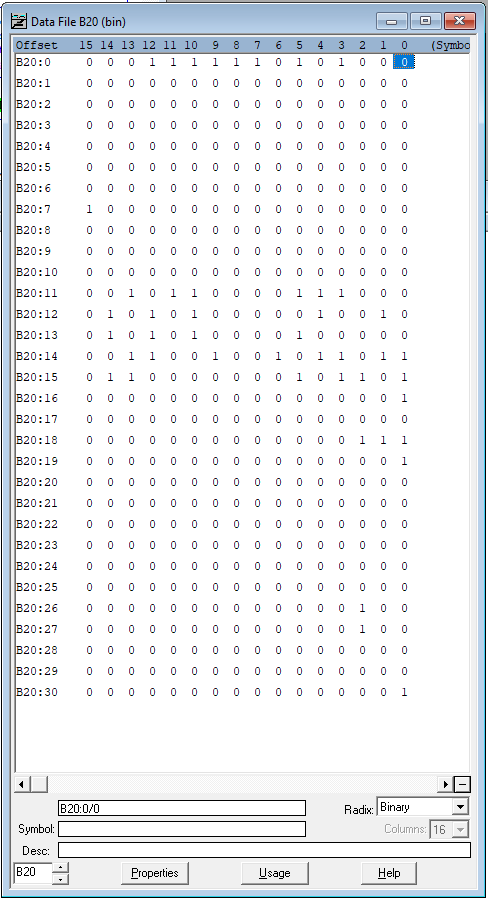
 COP from #B20:0 to #I:0.0, length 27, and my inputs are live.
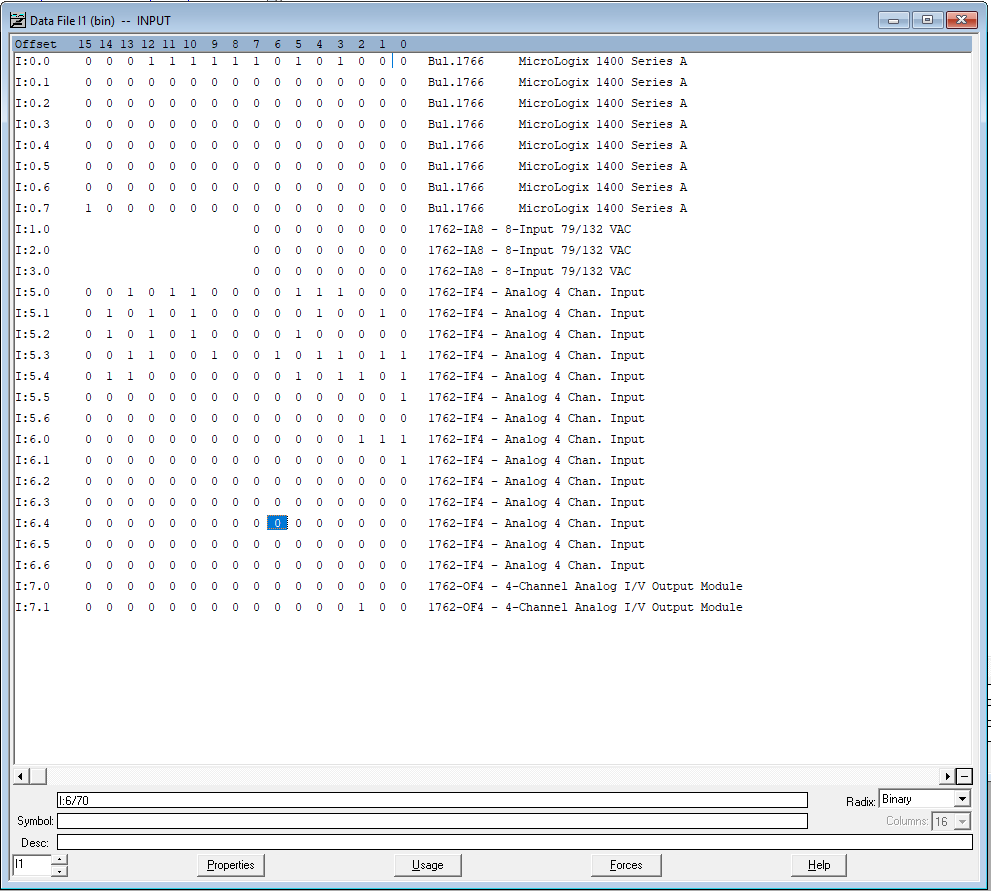
Why so much simpler than Siemens? Because on MicroLogix the input file I and a binary file B20 are both word-addressed with identical bit layout. There's no padding mismatch to fight — B20:0/0 maps to I:0.0/0, B20:1/0 maps to I:0.1/0, and so on, straight across. No serialize step needed; the bits already sit where they belong.
Comparing the two files below, the mapping is one-to-one: the real input file (embedded DI, the 1762-IA8 modules, the IF4 analog channels) and my fake B20 data share the exact same structure, so a straight copy lands every bit where it belongs.
Allen-Bradley CompactLogix — aliasing, and why it's my favorite
The Studio 5000 version is the most interesting of the three, because the tag-based architecture lets me solve the problem without copying any data at all — and it solves a second problem for free that has saved me real grief.
When you add a module in Studio 5000, it auto-generates module-scoped tags of a module-defined datatype. An embedded I/O controller gives you Local:1:I and Local:1:O of type AB:Embedded_DiscreteIO:...; a POINT I/O digital card gives you Local:2:I of type AB:1734_DI8:I:0; an analog card gives you Local:3:I of type AB:1734_IE8:I:0. The key fact most people never exploit: Studio 5000 lets you declare your own controller-scoped tag of that same module-defined datatype.
So I create my own tags — plain controller memory — one for each module tag I need, matching the datatype exactly. I write all my logic against those tags, never against Local:*. During testing they're just memory I drive from software.
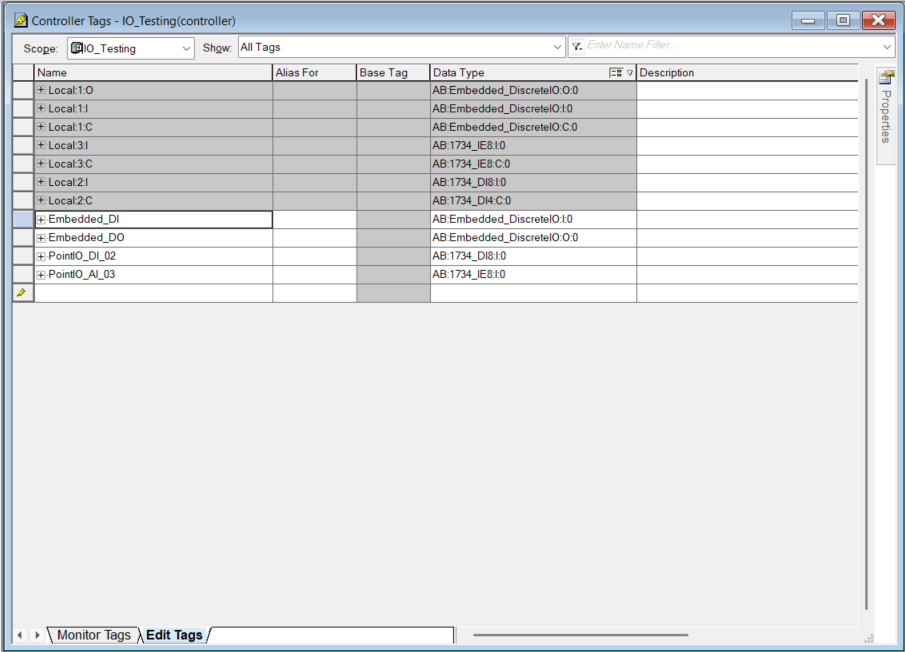 Note the naming. I deliberately do not call these
 Sim_ or Test_ or Fake_. These tags survive into production unchanged, so a name that implies "testing" would be a lie once the program is live and running real hardware. Embedded_DO reads correctly whether it's standalone memory on my bench or aliased to a physical output at site. Name the shadow tag for what the I/O is, not for how you're currently using it.
When the program is ready to deploy, I don't touch a single rung. I go to each of my tags and fill in the "Alias For" field, pointing it at the real module tag. Embedded_DI becomes an alias of Local:1:I, Embedded_DO of Local:1:O, and so on. From that moment the same symbol resolves to live hardware.
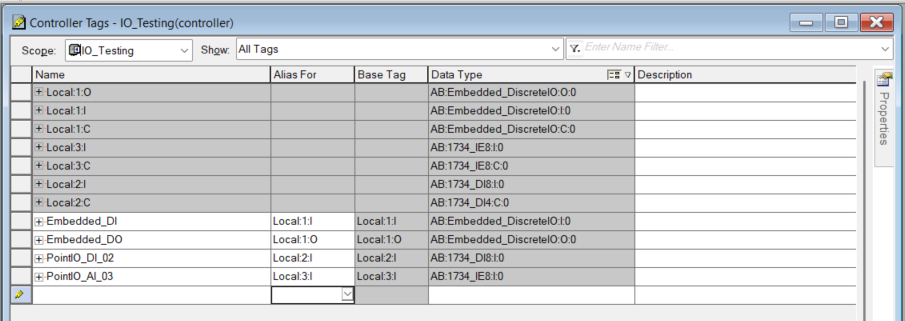 Put those two screenshots side by side and that's the entire technique: empty "Alias For" is test mode, filled "Alias For" is production, and the logic in between never changed. There isn't even a data copy — the alias makes the tag become the hardware reference.
The bonus: surviving a controller swap
Here's the part that turned this from "convenient" into "I do this on every project." Module tags in Studio 5000 are bound to the controller type. A 1769-L16ER-BB1B has 16 embedded digital inputs and 16 embedded outputs on board, so it carries the Local:1:* embedded-I/O tags. My office controller is an L30ER — no embedded I/O at all. The moment I switch the project's controller type to the L30ER to develop against the hardware I actually have, Studio 5000 deletes the embedded-I/O tags, because the target controller can't have them.
If my logic referenced Local:1:O directly, it would all break. But it doesn't — it references Embedded_DO, which is my own controller memory and has nothing to do with any module. It survives the swap untouched. So I develop and test on the L30ER on my desk, driving my own tags, and when it's time to deploy to the L16ER in the field I re-add the embedded I/O config and fill in the aliases. Develop on the hardware you have, for the target you don't, across a controller-family change, without editing logic.
Same principle, three idioms
Step back and the through-line is clear. The rule is always isolate the logic from the hardware boundary so it can't tell the difference — but each platform hands you a different tool to do it with:
MicroLogix stores the input file and a binary file with identical bit layout, so a single
COPjust works.Siemens packs its process image differently from a DB Bool array, so you serialize into a byte buffer and deserialize into
%I.CompactLogix makes module datatypes reusable, so you shadow them in plain memory and swap to hardware with an alias — no copy at all, and as a bonus your logic no longer cares what controller it's compiled for.
None of these adds a single line to the actual control logic. That's the whole point. A test setup that modifies the program you're trying to validate isn't really testing that program — it's testing a different one that happens to look similar. Keep the injection at the boundary, keep the logic pristine, and what you validate on the bench is exactly what runs in the field.
Oscar Calix
Sr, Control System Engineer
Cloud computing for OT, industrial data pipelines, SCADA supervision, full-stack tools for automation workflows..

.png)